
This article explains how users can model an ontology in metaphactory based on an existing schema taken from SAP HANA® Cloud.
From relational to semantic: Ontology modeling on SAP HANA® Cloud
In our last article, we explored how the integration of SAP HANA Cloud and metaphactory enables users to not only store and query knowledge graphs, but also model and explore them visually. In this article, we dive deeper into the specifics of ontology building to show you how to model and query a bespoke ontology using existing schema data imported from SAP HANA Cloud.
SAP HANA Cloud is a multi-model, in-memory cloud database that supports relational, graph, spatial, and document processing in a single platform. Its Knowledge Graph Engine enables users to build and query semantic knowledge graphs alongside relational data."
In this blog, we show you how you can model an ontology, and also how metaphactory’s AI features can support you in the process. To illustrate how this works, in this explainer, we will be creating a supplier ontology for a large enterprise. The goal of this project is to create a centralized resource that users from across the enterprise can query and retrieve specific supply chain information and data sources they need.
Table of contents
- Step one: Importing the datasource schema
- Step two: Ontology building with metis
- Step three: Manual ontology building and refinement
- Step four: Datasource mappings in metaphactory
- Step five: AI template and Search wizard-based app template creation
- Step six: Exploring your ontology with metaphactory’s search wizard and conversational AI
- Demo
- Next steps
Step one: Importing the datasource schema
To begin ontology modeling on SAP HANA Cloud, you first need to import the datasource schema into metaphactory.
Imagine your company wants to create a centralized, comprehensive supplier ontology. This ontology will help humans with and without technical expertise, and also AI, to locate data needed to answer supply chain questions. But like many large enterprises, the information they need is spread across disparate documents and files, all organized and formatted differently. Luckily, because data schemas on the SAP HANA Cloud account capture this valuable information; all of this data can be utilized to build an ontology.
Our first step in this project is to create a datasource and provide a name and optionally a description. In our example, the name is “SRM: Supplier Relationship Management”, and includes the description: “The SRM system holds information for suppliers along with their global market regions, departmental contact networks, and critical risk assessment factors. It serves as a centralized digital directory that maps out a partner's legal identity and physical factory locations while maintaining a real-time "report card" on their performance. By consolidating financial health ratings, quality scores, and sustainability audits into a single profile, the system allows the manufacturer to vet every partner and ensure that the global supply chain remains stable, compliant, and ready for production”.
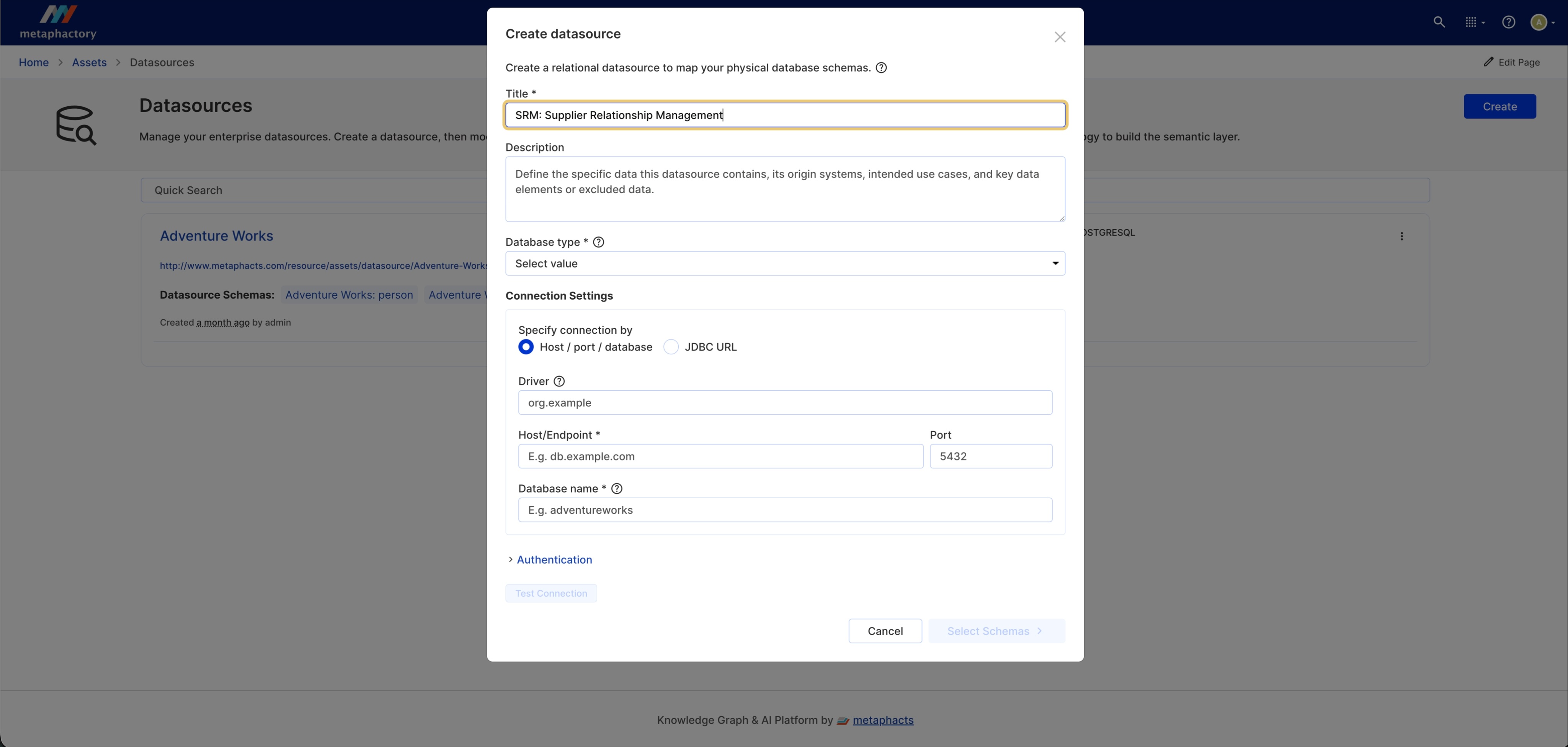
Image: SAP HANA Cloud datasource creation and connectivity configuration in metaphactory.
The next step is to ensure connectivity between metaphactory and SAP HANA Cloud. To do this, you need to choose the JDBC (Java Database Connectivity) URL connection setting between your SAP HANA Cloud instance and metaphactory. After providing the SAP driver URL and credentials, you can test the connection. Once you have made sure they are connected, you are ready to click “Select Schemas”.
In our example, we locate the schemas that contain supplier data. If you select multiple schemas to upload, each becomes a separate “Datasource Schema” asset. In our example, we will choose just one schema (with five tables) to import: the “KGE_USER” schema.
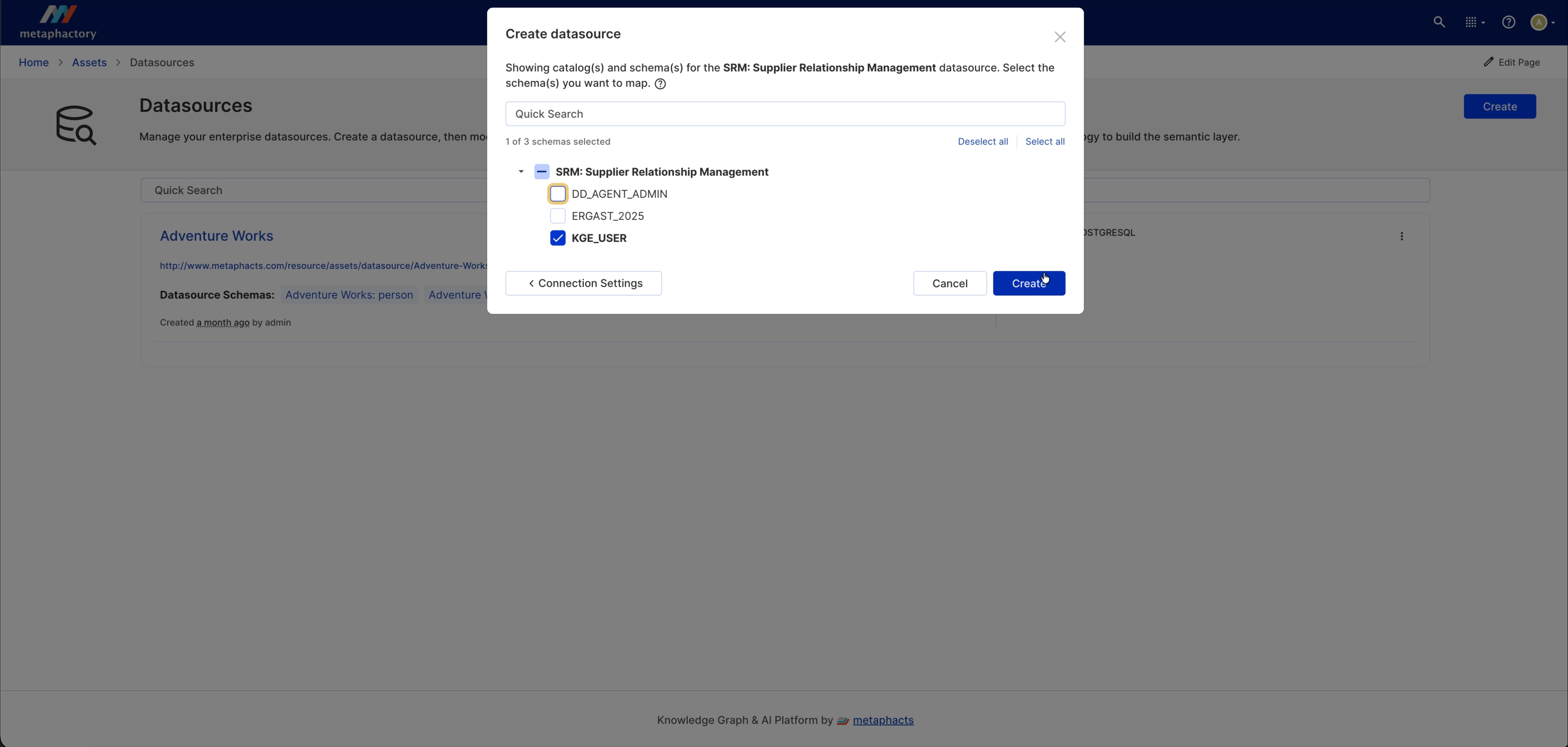
Image: selecting the schema for the SRM Supplier Relationship Management datasource.
Press “Create”, and wait for the diagram to load. You will see the main data schema represented as the node “SRM: Supplier Relationship Management: KGE_USER” with six other connected nodes, including the tables inside the data schema such as “PARTNER_CONTACTS”, “PARTNER_ADDRESSES” and “BUSINESS_PARTNERS”.
Congratulations, you have successfully created an RDF representation of your schema!
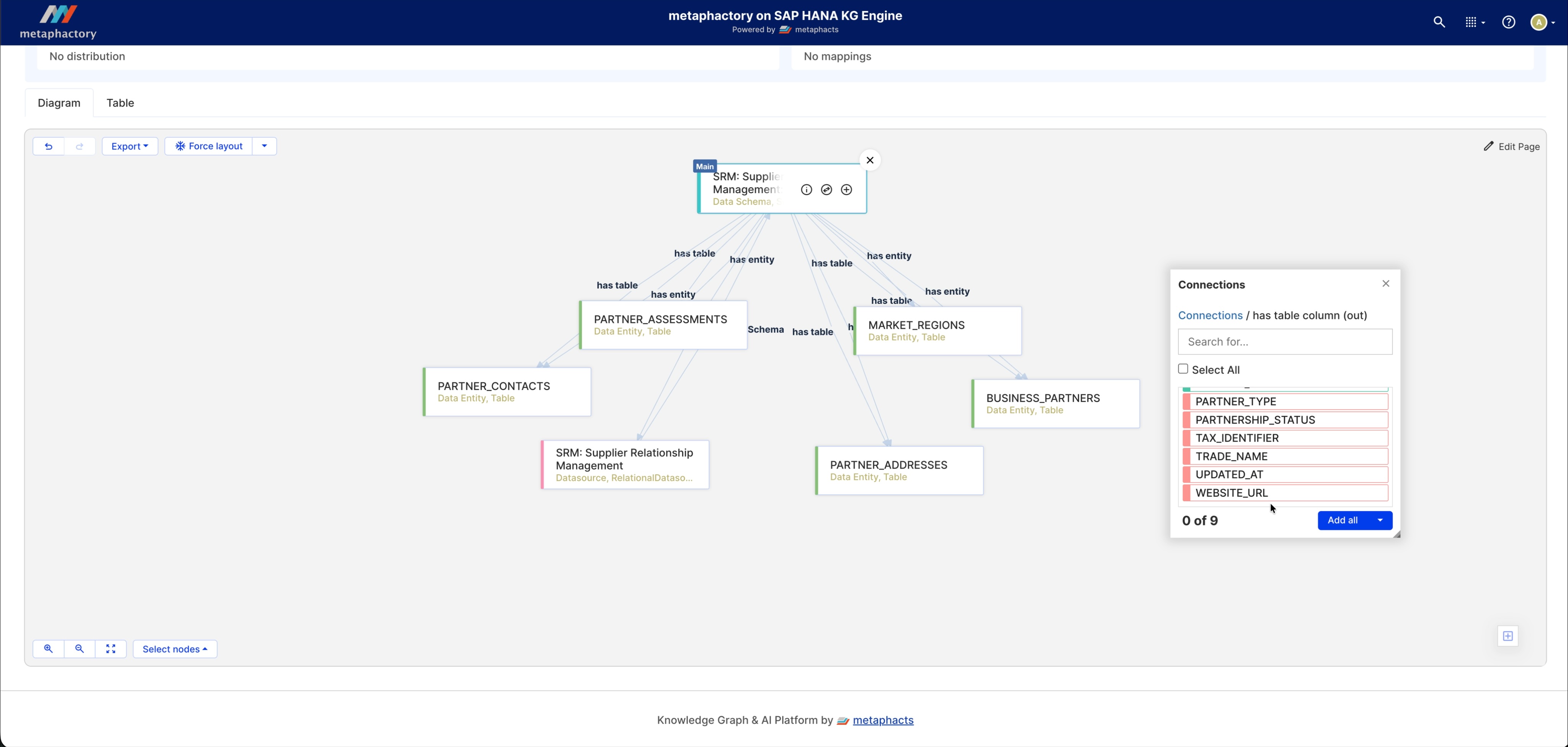
Image: Diagram of the loaded datasource schema in metaphactory on SAP HANA KG Engine.

Step two: Ontology building with metis
In this section, we will show how you can use AI technology to build your ontology with your SAP HANA Cloud data. To begin, create an ontology and provide the title: Supplier Relationship Management Ontology. Expand the additional metadata and settings and select the data source “SRM: Supplier Relationship Management”.The context for building this ontology will use this datasource which was loaded in the previous step.
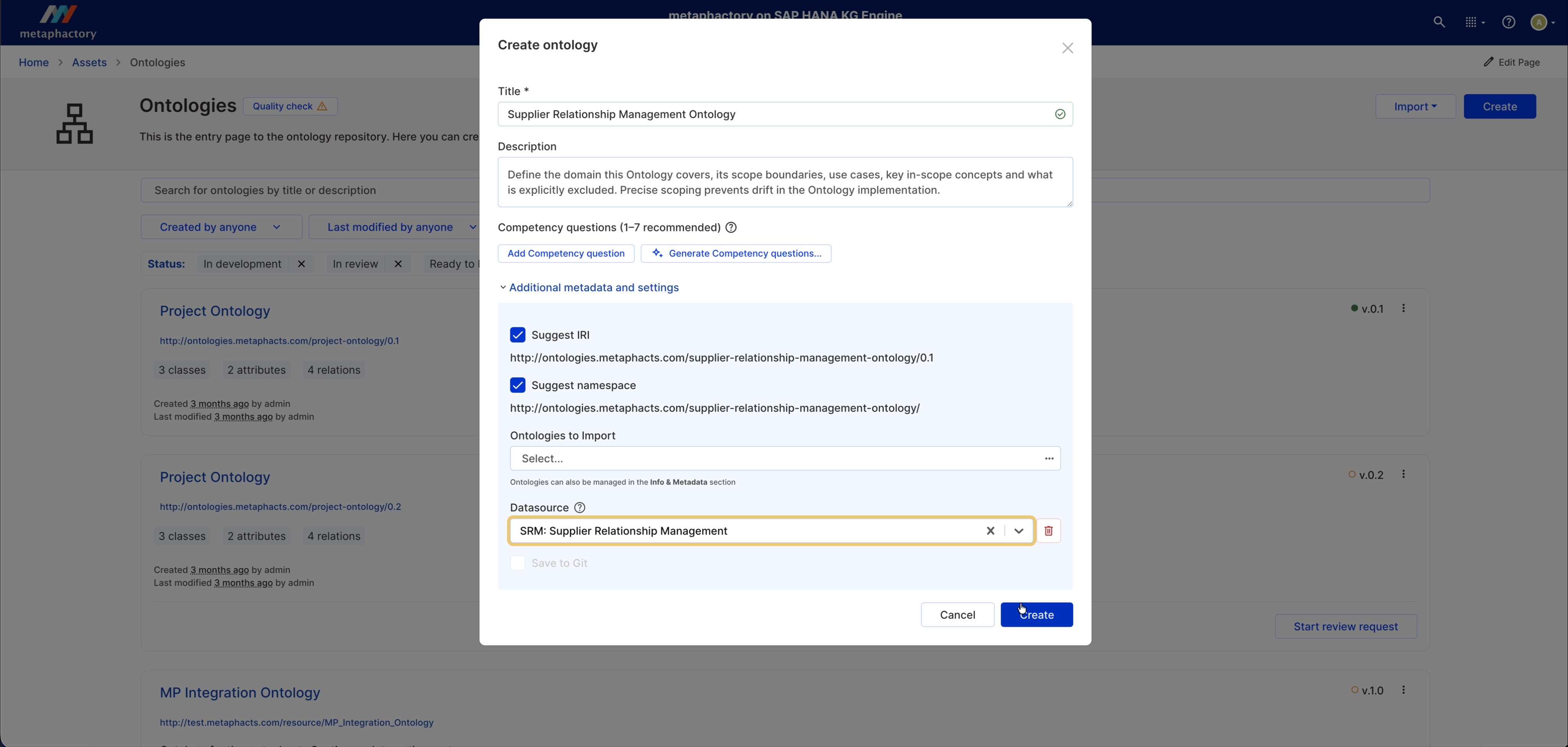
Image: Creating the Supplier Relationship Management Ontology.
Next, we need to build our ontology. We can start this process with our AI semantic modeling assistant metis. metis combines knowledge from large language models and knowledge graphs to assist you with ontology building via its conversational interface.
metis will help us to build our ontology (like classes and relations) based on the schema loaded from the relational database. Following the LOT methodology, metis will start by providing the initial context we have for the initial ontology state. Via back-and-forth conversation, metis will help to suggest the ontology structure best suited to your business case needs based on the imported schema.
You can ask metis to go ahead and encode the elements you are happy with creating. For example, start with “Supplier”, “SupplierAddress”, “SupplierContact”, “SupplierAssessment”, “MarketRegion” as our main classes.
metis can also propose competency questions, based on ontology metadata, and the datasource which is used in the context of this ontology. An example question generated in our example is “Which suppliers are currently approved for a given product, service, or category?”. If the ontology fails to answer the proposed questions, you can use the conversational interface to make relevant tweaks, or make manual mapping changes yourself.
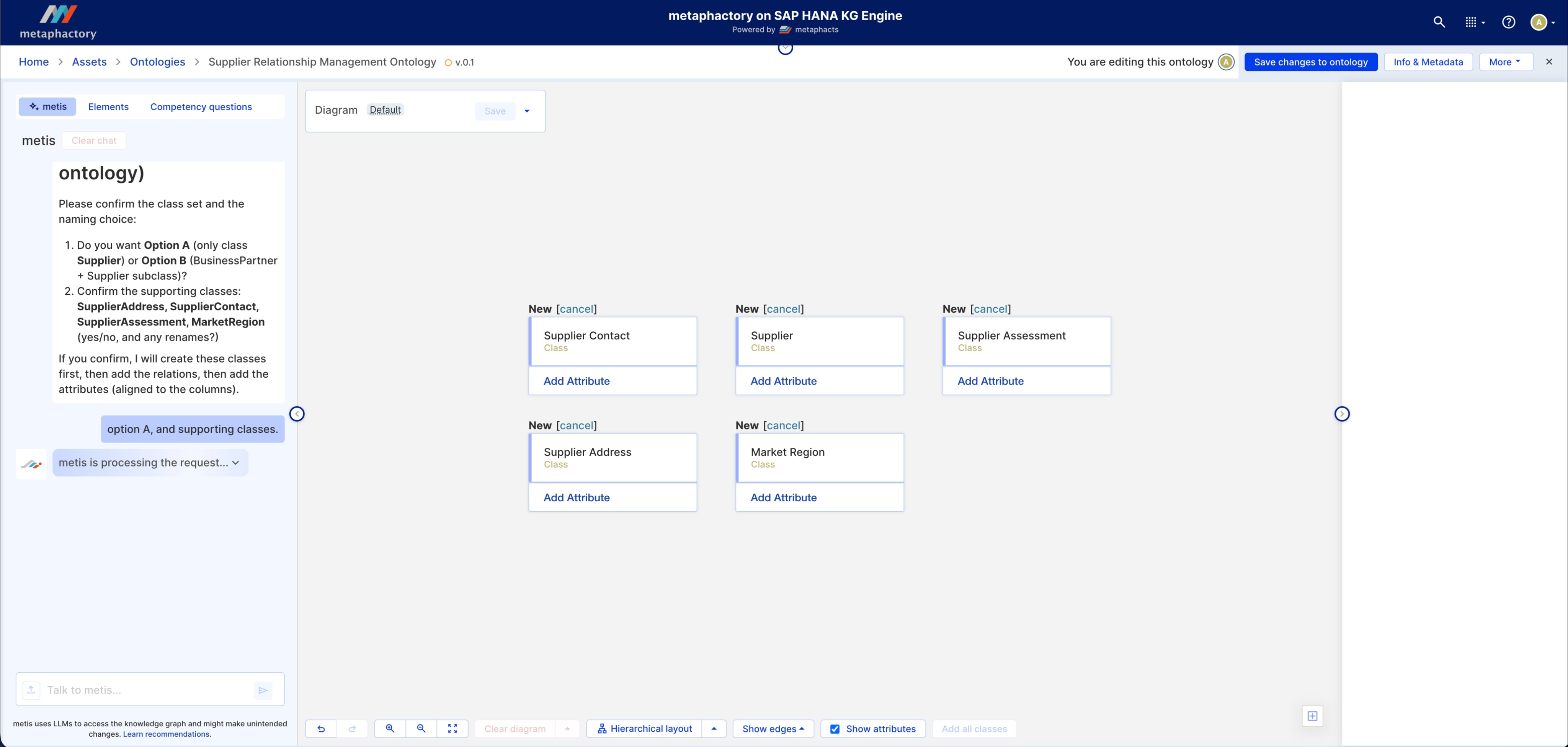
Image: Using the metis conversational interface to build and refine an ontology.
Step three: Manual ontology building and refinement
In addition to AI-generated ontology building, users can create and refine the ontology themselves in the Visual Ontology Editor. This is always recommended as a human-in-the-loop best practice.
The metaphactory interface is designed to make semantic modeling intuitive and hassle-free, making knowledge graphs accessible to users without extensive technical experience. In our example, we may want to enrich the ontology with additional information. First, review the metis suggestions in the metis tab and on the diagram canvas. Here, you can modify and remove the changes proposed by metis.
In our example, we notice that we need to add the synonym “Business Partner” to the Supplier class. We also need to add a label attribute with cardinality 1 to the Supplier class.
Each change we make in metaphactory is reflected in real time in the underlying data in the connected SAP HANA Cloud Knowledge Graph Engine. If you need more pointers on best practices for semantic modeling, you can read our simple guide, or practice for yourself and sign up for free for our interactive semantic knowledge modeling tutorial.
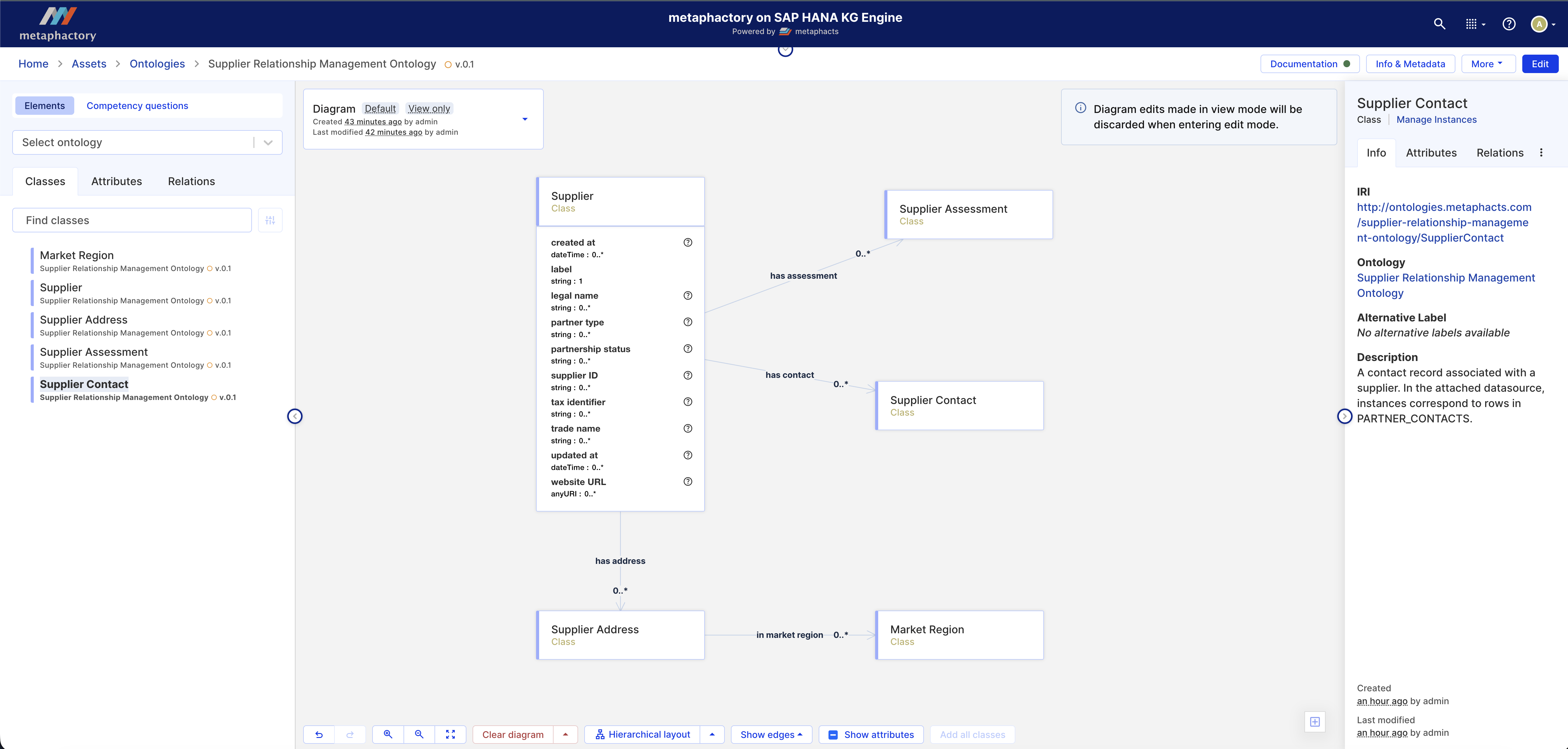
Image: Making manual ontology edits in metaphactory on SAP HANA KG Engine.
Step four: Datasource mappings in metaphactory
Once we have created and are happy with our ontology, we are ready to create our schema ontology mappings.
Step one is to click on the datasources page on metaphactory and select “SRM: Supplier Relationship Management”. Next, select the datasource schema link. On the next page, click the drop-down beside the “Datasource Mappings” box, and create a mapping called “SRM mappings”. From here, select “Map Data Schema” and choose “Supplier Relationship Management Ontology” from the drop-down list, which is the ontology we created in the previous step. Make sure to check “Map and Generate AI Mappings” on the drop-down arrow next to the “Map” button.
The AI will generate mappings between the ontology and the selected data from SAP HANA Cloud. Once the generation is complete, you can expand the rows in the data table to explore the generated mappings. You can consult our documentation to learn more details about schema ontology mappings.
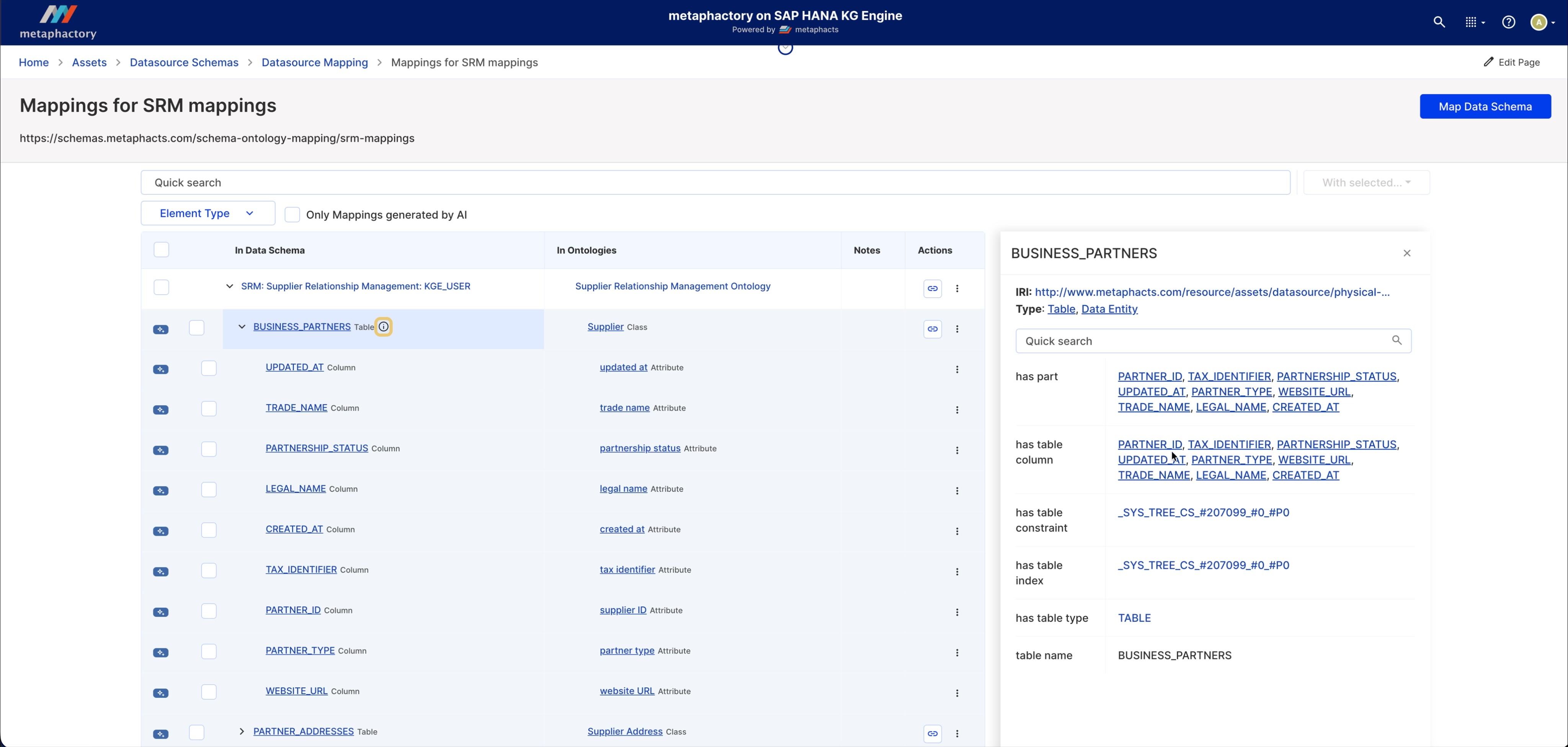
Image: Mappings for SRM mappings in metaphactory on SAP HANA KG Engine.
Step five: configuring conversational AI with metis
In this step, we will briefly overview on how to configure conversational AI in the metaphactory on SAP HANA KG Engine. For more detailed information, you can watch the accompanying demo video or consult our resources page.
To create a search and discovery agent, you need to select “AI Services” from the toolbar to create a template with the conversational AI component. This can then be pointed to the agent configuration using the “Agents” and “Template & Applications Pages” sections in the toolbar.
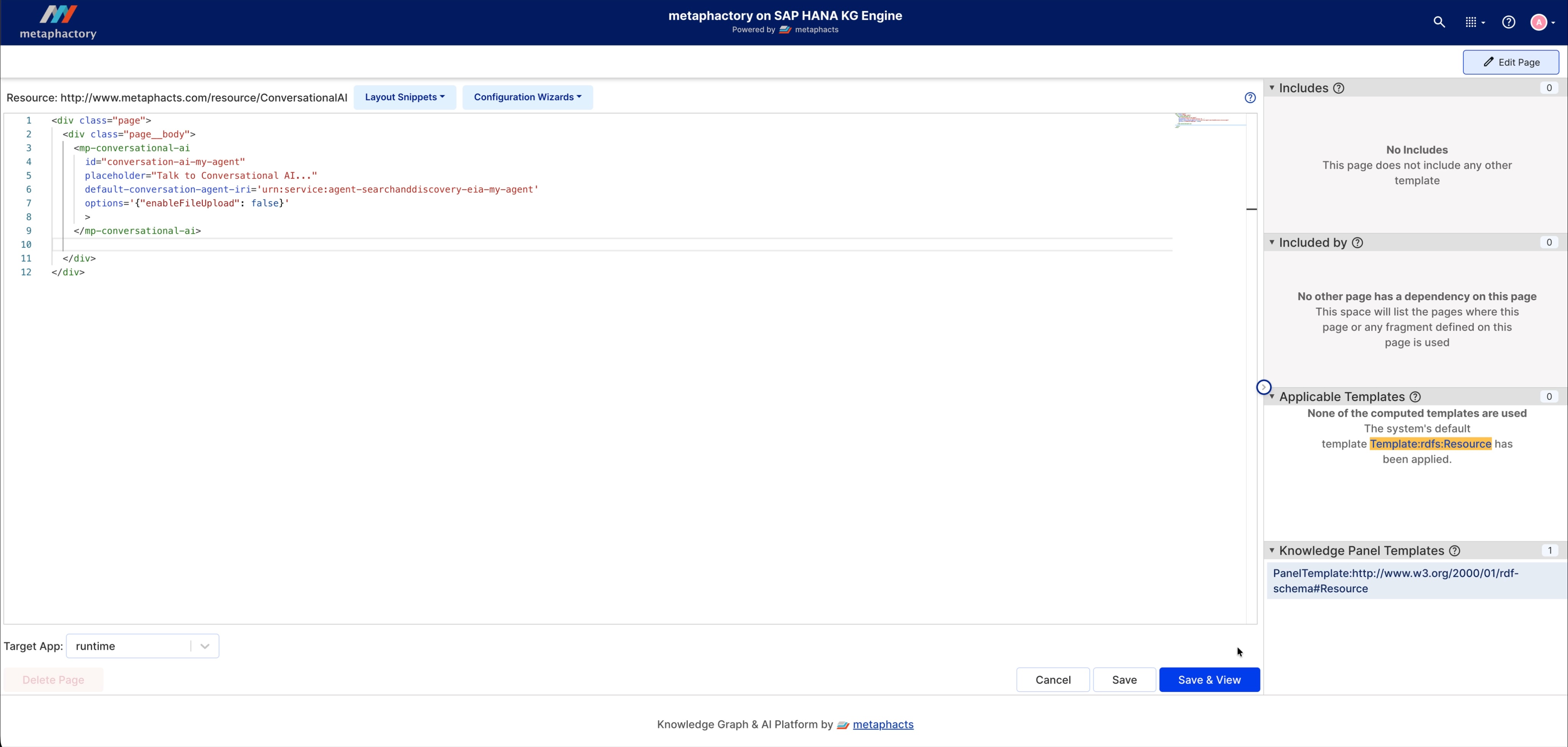
Image: Configuring conversational AI on the metaphactory on SAP HANA KG Engine.
Once you have configured your conversational AI, you can ask questions about the ontology and datasource. For example, if you ask “describe the class supplier”, metis will process the request and return the relevant summary.
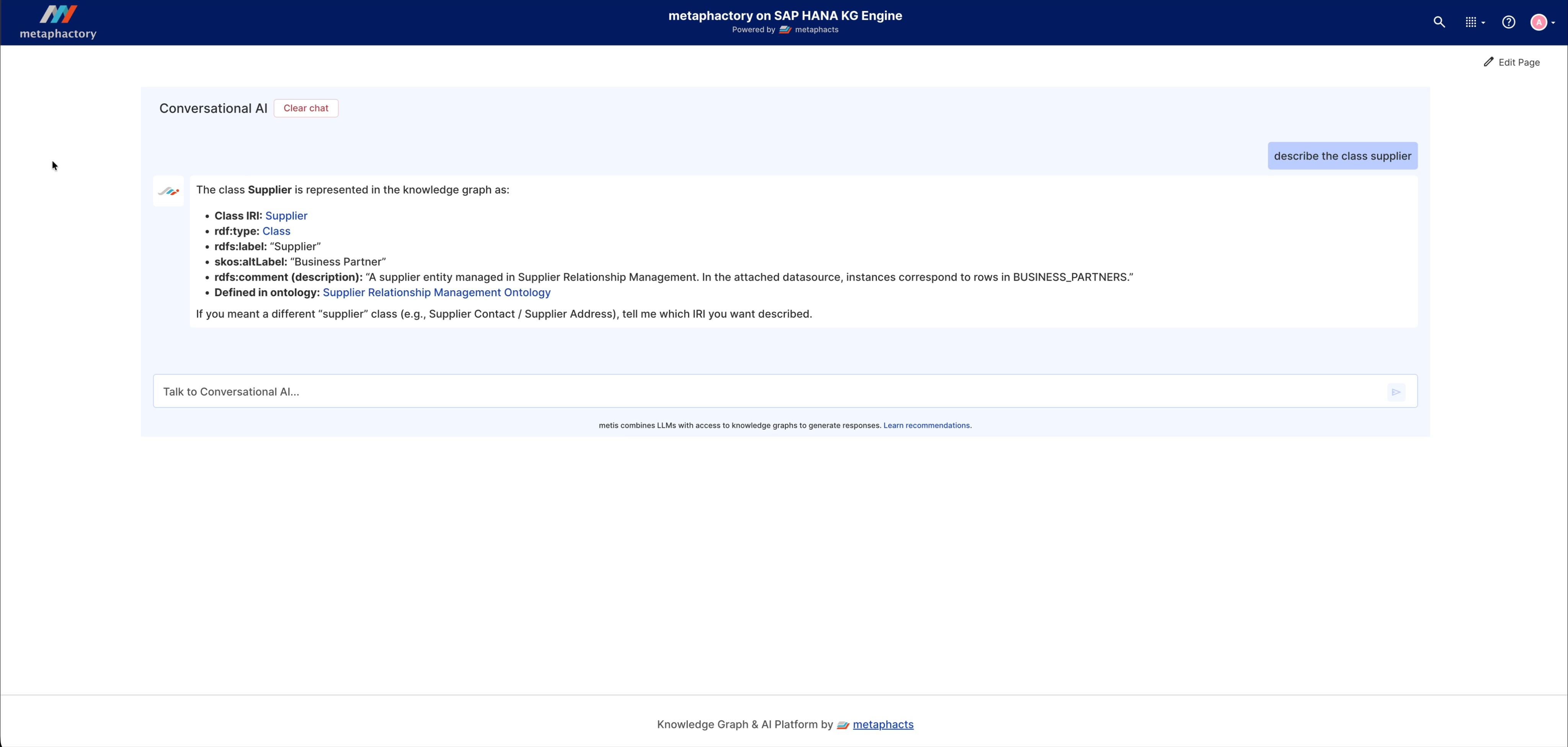
Image: Querying the data schema with the successfully configured conversational AI.
Step six: Exploring your loaded schema, ontology and mappings with metaphactory’s conversational AI agent
Now that you have mapped your classes and relations and refined the corner cases, you are ready to share your ontology with your colleagues, who can explore and utilize the ontology via the conversational AI agent you set up in the previous step. This agent uses the mappings, as well as the ontology and datasource, to enable users to query data from the datasource directly. Besides this, we can also use the ontology we’ve built to create a virtual knowledge graph, which will be the topic of a future blog post in this series.
For now, let’s focus our attention on the capabilities of the conversational AI agent. For example, say someone from the compliance and regulation team needs to verify which suppliers pose regulatory or business risk. They could ask the search wizard “Where do I find risk level and financial rating information for suppliers?” and it would point them to the SAP HANA Cloud data schema (the SRM: Supplier Relationship Management: KGE_USER we imported), and the specific locations within that data schema that are relevant to the question. metis will also point out any ambiguity or additional context which might be helpful to the end user. In this example, the two attributes (“RISK_LEVEL” and “FINANCIAL_RATING”) are mapped to an assessment entity and not directly to a mapped supplier table/entity.
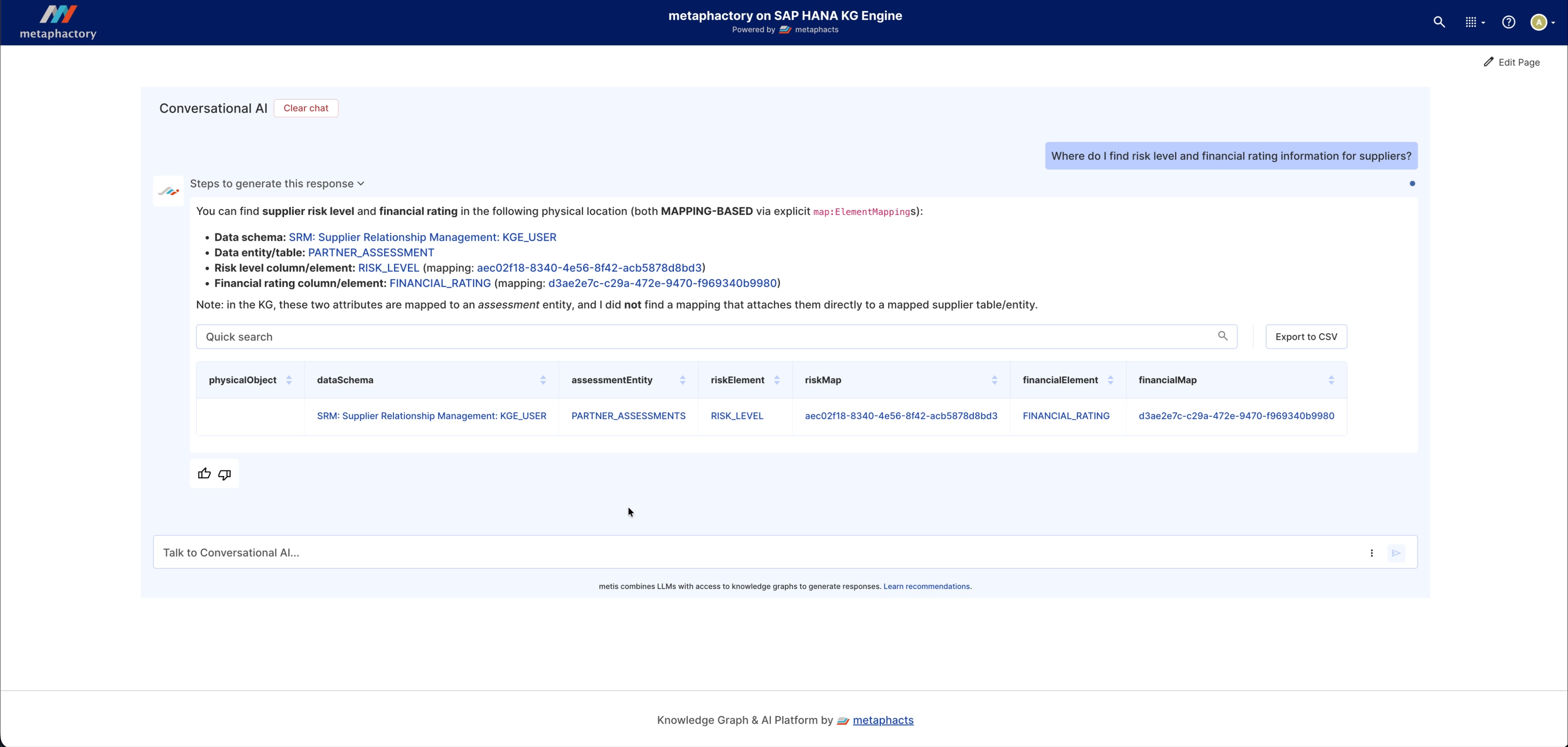
Image: Querying the Supplier Relationship Management ontology with metis.
This concludes our guide to Ontology Modeling with metaphactory and SAP HANA Cloud.
Demo
In this video, we take you step-by-step through the process we’ve outlined in the above article. The demo starts with schema load, continues with ontology creation and datasource mappings and finishes with configuring and exploring the conversational AI.*
*Note: This demo was built using metaphactory 6.0. Certain features shown—such as schema mapping—are not available in metaphactory 6.1, where mappings are now managed at the Datasource level rather than the schema level.
Next steps
In this series of articles, we’re exploring the many ways that connecting SAP HANA Cloud with metaphactory helps users model, explore and manage their ontologies with greater ease, more efficiency and with more valuable business outcomes.
We’ve outlined the key benefits of this partnership in our announcement, and in this article, shown how this integration works in one real-life scenario. Expect to see more blogs in our SAP HANA Cloud x metaphactory series sharing more of the advantages you can unlock in this exciting new collaboration.
Using metaphactory on SAP HANA Cloud shortens the time between domain-isolated schema and enterprise-wide semantic intelligence for AI. Speak with an expert to learn more about what data potential metaphactory on SAP HANA Cloud could unlock for you.
About metaphactory
metaphactory is an industry-leading enterprise knowledge graph platform transforming data into consumable, contextual, and actionable knowledge. Our low-code, FAIR Data platform simplifies capturing and organizing domain expertise in explicit semantic models, extracting insights from your data, and sharing knowledge across the enterprise. metaphacts serves enterprise customers across life sciences, energy, manufacturing, and financial services
About SAP HANA® Cloud
SAP HANA® Cloud is a cloud-native, multi-model database that unifies relational, graph, spatial, document, and vector processing in a single platform. It enables organizations to manage and analyze enterprise data in real time - powering smarter decisions and AI-ready applications at scale.
About SAP
As a global leader in enterprise applications and business AI, SAP stands at the nexus of business and technology. For over 50 years, organizations have trusted SAP to bring out their best by uniting business-critical operations spanning finance, procurement, HR, supply chain, and customer experience.